
Vue项目的上线
大约 1 分钟
vue项目上线至生成环境前,要经过编译,将生成的 css、js、html放在web服务器上。
打包编译:
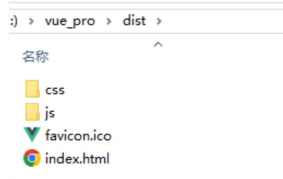
npm run build编译完的css、js、html会防止在项目的 dist/ 目录下。拷贝至 webApp 的根路径下即可。
SPA中的请求路径
URL路径中 # 后面的路径称为 hash。这个 hash 不会作为路径的一部分发送给服务器。
如:http://localhost:8080/vue/bugs/#/a/b/c/d/e 的真实请求路径是:http://localhost:8080/vue/bugs
SPA 路由的两种路径模式:
hash 模式:默认。
- 路径中带有#,不美观。
- 兼容性好,低版本浏览器也能用。
- 项目上线刷新地址不会出现 404。(发起的请求不会携带hash,hash是另外解析的)
- 第三方 app 校验严格,可能会导致地址失效。
history 模式
路径中没有 #,美观。
如:http://localhost:8080/vue/bugs/a/b/c/d/e
兼容性稍微差一些。
项目上线后,刷新地址的话会出现 404 问题。需要后端人员配合可以解决该问题。(整个URL路径都会发送请求,导致404)
开启 history 模式:在创建路由器对象 router 时添加一个 mode 配置项
// index.js
const router = new VueRouter({
    mode : "history"
    // 默认:
    // mode : "hash"
    // ... 其他配置
})
history模式404的解决方案
在web服务器中添加404错误的重定向即可。
以tomcat为例:
<!-- web.xml -->
<?xml version="1.0" encoding="UTF-8"?>
<web-app xmlns="https://jakarta.ee/xml/ns/jakartaee"
         xmlns:xsi="http://www.w3.org/2001/XMLSchema-instance"
         xsi:schemaLocation="https://jakarta.ee/xml/ns/jakartaee
                             https://jakarta.ee/xml/ns/jakartaee/web-app_6_0.xsd"
         version="6.0" metadata-complete="true">

    <!-- 404重定向至index,将路径交由前端进行二次解析,即可保证刷新不影响 -->
    <error-page>
        <error-code>404</error-code>
        <location>/index.html</location>
    </error-page>
</web-app>